User: The “Gateway error rate > 3%” alert is firing. Find the cause and suggest a fix.The “Gateway error rate > 3%” alert is firing. Find the cause and suggest a fix.
I’ll find the service behind gateway’s errors, follow one failed request to its span and log, then check the code.
User: Why is the pool running dry?Why is the pool running dry?
Inspect the query pathComplete
Read orders/orders.repository.js → getOrder()
Proposed fix
Root cause found. Fix ready for review.
getOrder() releases its pooled Postgres client only when the query succeeds. Every failed query leaks a client until the pool is empty, so orders times out waiting to connect and gateway returns 504s. Release the client in finally, so failed queries return it to the pool too.
Walls of dashboards you have to already know how to read
Alerts that tell you something broke — then you dig for hours
You are the correlation engine, stitching signals together by hand
Panels everywhere. Alerts firing. Still no cause.
dashboards / production overviewFiring
gateway · errorsFiring
orders · p99
node · cpu
pg · connections
cart · req/s
payments · latency
pod · memory
gateway · p99Latency ↑
queue · depth
disk · io
orders · errorsErrors ↑
catalog · latency
AI-native observability
An agent instruments your whole stack in minutes — live in under an hour
Ask in plain language. No PromQL, no dashboard archaeology
An investigation agent in your IDE hands you the root cause and a fix
The machine does the correlating — from a frontend click to the database query
One answer: the cause, the evidence and the fix.
your agent / ordersRoot cause
Why is “Gateway error rate > 3%” firing?
getOrder() releases its pooled Postgres client only when the query succeeds. Every failed query leaks a client until the pool is empty, so orders times out waiting to connect and gateway returns 504s.
RUM504 on /checkout
APMorders 10.3% errors
TraceSELECT orders 4.32s
Logpg-pool: connect timeout
Release the client in finally, so failed queries return it to the pool too.
One incident, every signal
From the alert to the line that caused it
Real Osuite screens from one incident in our demo environment. Follow it signal by signal, on the same path your agent takes in minutes.
01Alert
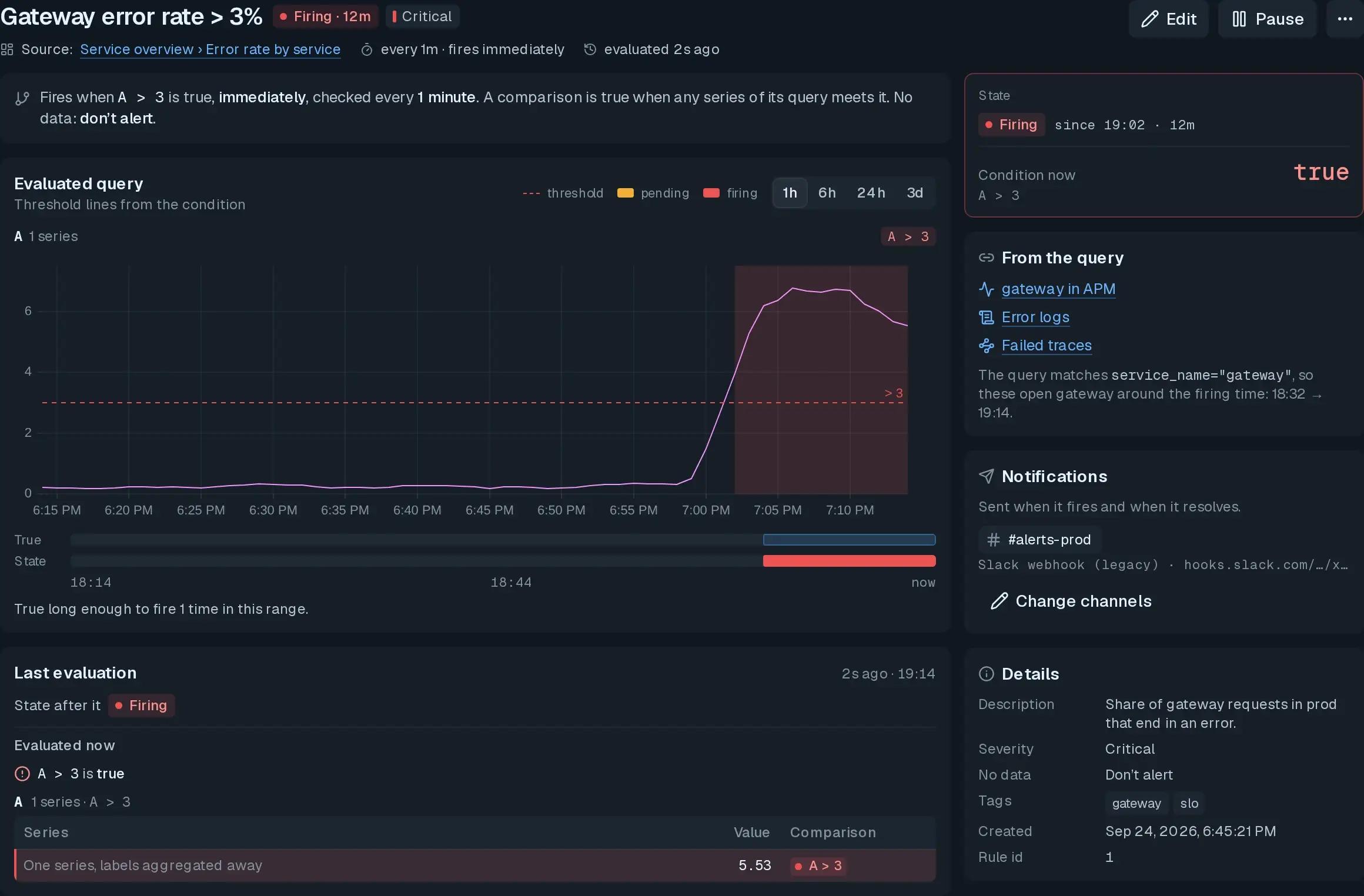
The alert fires
gateway’s error rate crosses its 3% threshold and holds. The alert pages #alerts-prod with the rule, the live value and one-click links into APM, logs and traces.
Severity
Critical
Condition
A > 3
Firing for
12m
Critical · checked every 1m
Now 5.53 · threshold 3
Critical · checked every 1m
Now 5.53 · threshold 3
Now 5.53 · threshold 3
Now 5.53 · threshold 3
02APM
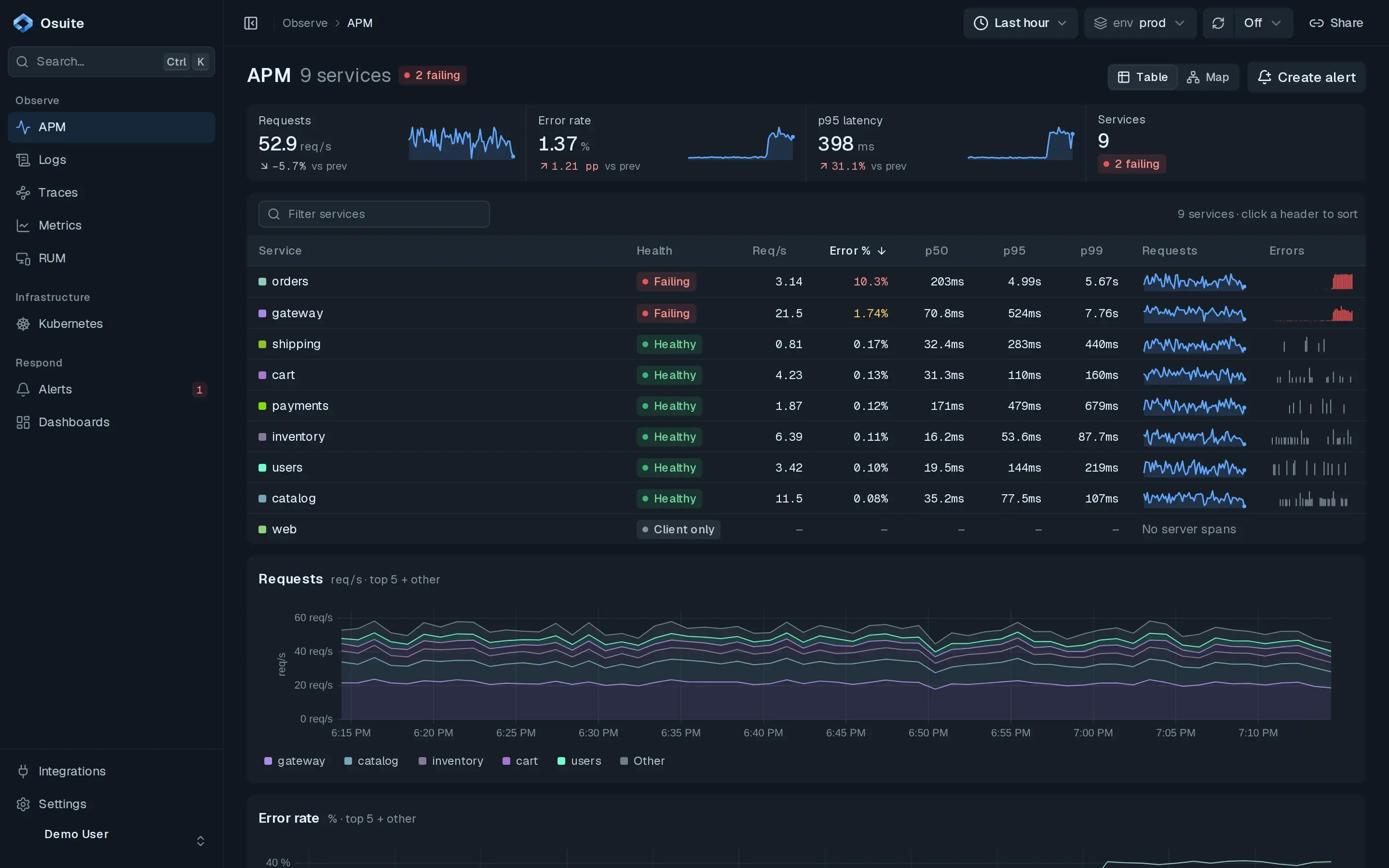
Find the blast radius
gateway is the one paging, but the errors start further down. 2 of 9 services are failing, and orders has the highest error rate, with tail latency in seconds.
orders errors
10.3%
orders p99
5.67s
gateway p99
7.76s
orders · 10.3% errors
gateway · p99 7.76s
orders · 10.3% errors
gateway · p99 7.76s
orders · 10.3% errors
gateway · p99 7.76s
orders · 10.3% errors
gateway · p99 7.76s
03Trace
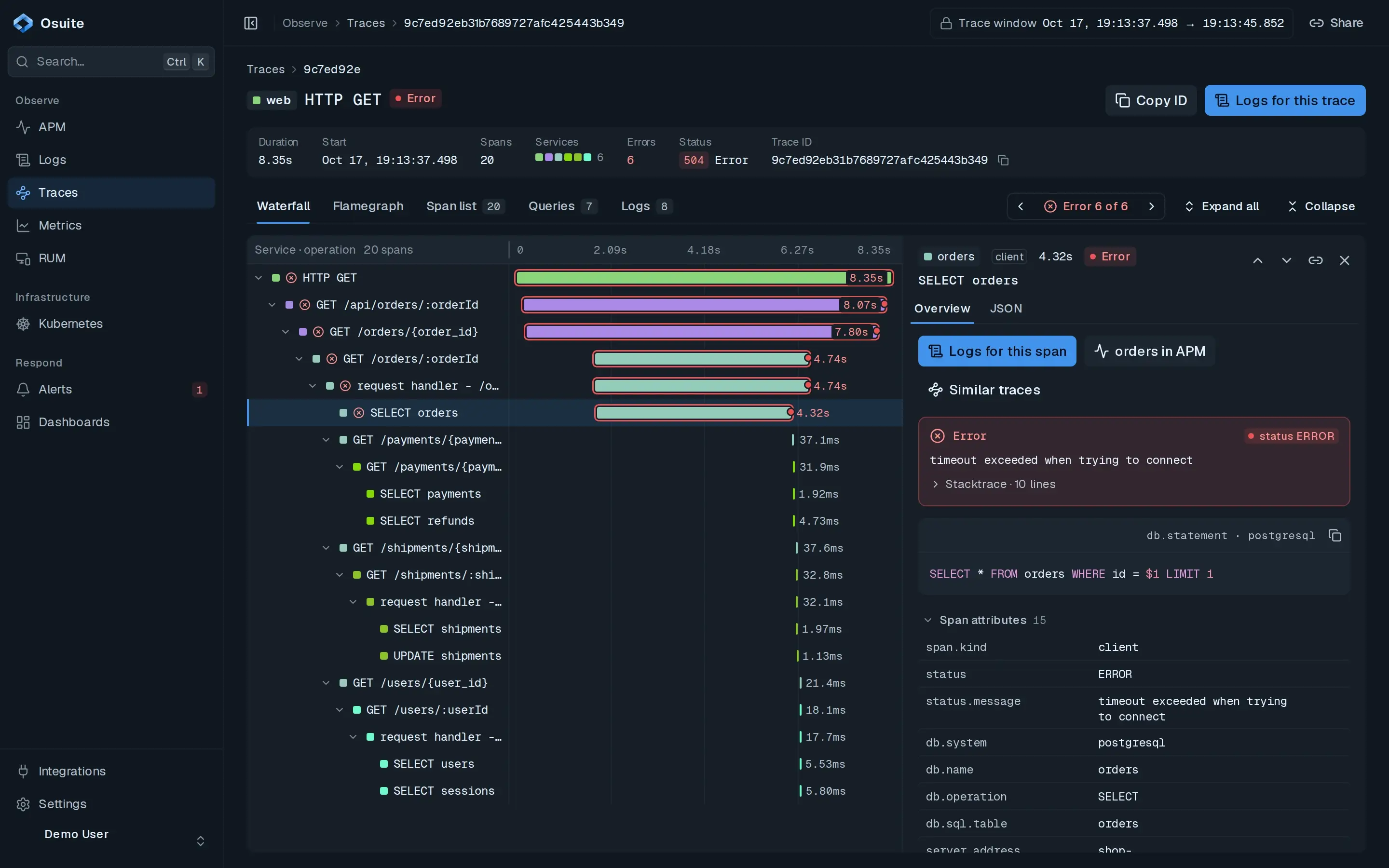
Follow one failed request
One request, 8.35s end to end, ending in a 504. The deepest failure is orders asking Postgres for a single row, and that span never got a connection.
Duration
8.35s
Status
504
SELECT orders
4.32s
SELECT orders · 4.32s · no connection
A 1-row lookup, not a slow query
SELECT orders · 4.32s · no connection
A 1-row lookup, not a slow query
SELECT orders · 4.32s · no connection
A 1-row lookup, not a slow query
SELECT orders · 4.32s · no connection
A 1-row lookup, not a slow query
04Logs
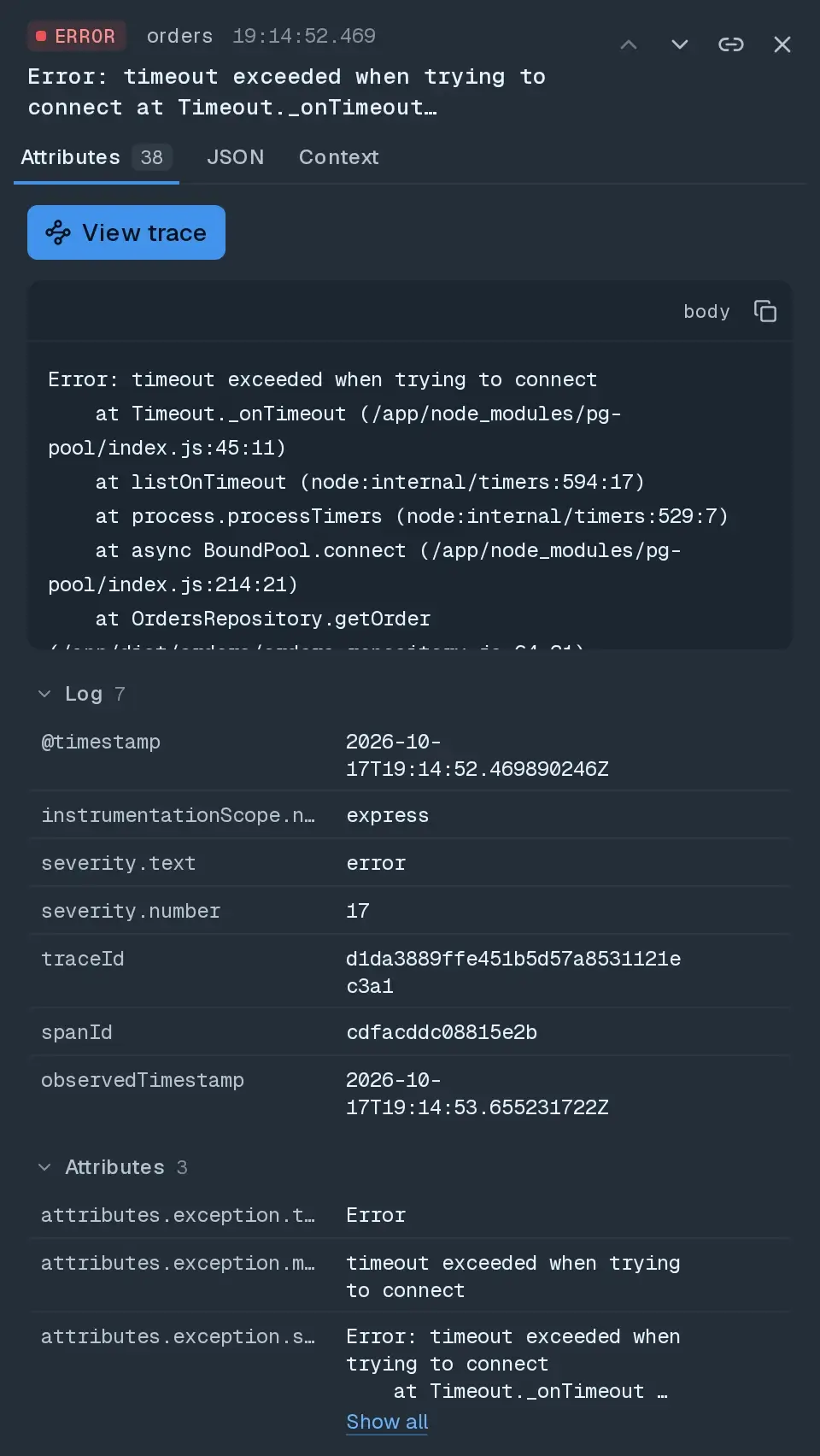
Read the log behind it
Every failing request logs the same orders error, and its stack says why: pg-pool gave up waiting for a free client. The pool is exhausted, so orders fails and gateway times out behind it.
trace 9c7ed92ethe request from step 03, oldest first
19:13:43.993ERRORorders Error: timeout exceeded when trying to connect at Timeout._onTimeout (/app/node_modules/pg-pool/index.js:45:11)
19:13:43.993INFOorders GET /orders/721912 500 19776 - 4743.346 ms
19:13:45.710ERRORgateway Error #01: Get "http://orders:3000/orders/721912": context deadline exceeded (Client.Timeout exceeded while awaiting headers)
19:13:45.710ERRORgateway [GIN] | 504 | 8070.193 ms | 10.0.0.209 | GET "/api/orders/721912"
One click back to its trace
pg-pool: no free client in time
One click back to its trace
pg-pool: no free client in time
One click back to its trace
pg-pool: no free client in time
One click back to its trace
pg-pool: no free client in time
05Fix
Get the root cause and a fix
Your agent walks the same path through the Osuite CLI, follows the stack into getOrder() and proposes a change in your IDE, ready for you to review.
your agent
/ orders osuite-investigate
The “Gateway error rate > 3%” alert is firing. Find the cause and suggest a fix.
Find failing gateway requests
Follow the slowest failure
Read the orders error logs
Inspect the query path
Proposed fix
Ready for review
Root cause found. Fix ready for review.
getOrder() releases its pooled Postgres client only when the query succeeds. Every failed query leaks a client until the pool is empty, so orders times out waiting to connect and gateway returns 504s.
“Observability is P0 for us! We have setup full stack observability using Osuite. Integration with our system was done in no time, all thanks to the fantastic technical support from the Osuite team.”
SC Sidharth Choraria Co founder, Infinity
Case study
How Infinity keep their finance backend running reliably
It means the platform does the work AI can do for you. An agent instruments your stack, an investigation agent that lives in your IDE finds the root cause and a fix when something breaks, and a visualizer agent builds dashboards from plain English. You spend far less time wiring things up and digging through dashboards.
Is this LLM or AI-model monitoring?
No. Osuite is full-stack observability — logs, traces, metrics, RUM, and infrastructure — for any application. "AI-native" describes how Osuite works (agents do the heavy lifting) and who it's for (teams that ship fast with AI), not a tool for monitoring AI models. You don't need to build anything with AI to use it.
How quickly can we get your system up and running?
Most teams are live in production in under an hour — the Osuite instrumentation agent wires up logs, traces, and metrics across any stack in about five minutes. Larger estates with dozens of services can take one to three days to fully roll out.
Does your system support our backend technology?
Yes. The Osuite instrumentation agent is OpenTelemetry-native and supports every major language and framework with zero-code instrumentation — most teams are sending data within minutes.
How do you ensure the security of our data?
Our on-premise solution keeps your sensitive data within your cloud, ensuring maximum privacy and robust security.
Would it take too long to migrate from another tool?
No. With the instrumentation agent and zero-code setup, most migrations take under a day. Our dedicated migration team handles it with you.
We already have too many dashboards and alerts. How do we migrate them?
The setup, instrumentation and migration is completely done for you. It comes with the essential dashboards out of the box. We also set up alerts for the essential alerts and notification.
Can we run it On-Premise?
Yes. We offer fully managed on premise setups for companies with sensitive data.
Can I get notified when something goes wrong in our system?
Yes, we integrate seamlessly with your preferred notification services for real-time alerts.
See what Osuite can do for your team
Get a personalized walkthrough of the platform and a cost comparison
against your current observability stack.